Thursday, 28 November 2013

Unit 67 Computer Game Engines

Gradual targets:
  1. add in compatibility for WASD / directional controls. (16th january)


Task 1 - 2D and 3D Game Engines


Game engines are essentially the very foundation of a game, possibly just a rendering engine for graphics, or a complicated assortment of algorithms to determine how physics effect objects or how light reflects off walls.

we can classify game engines to two major areas, 2D games and 3D games.

2D games have the largest roots, from old games like 'sonic the hedgehog' to 'Super Mario bros', its no doubt 2D game engines have been around since the early days of gaming

with modern development 2D game engines are a lot more capable than they used to be, with higher quality graphic utilising better particle physics, colours or game physics
thanks to these improvements games can be more artistically stunning, and also have more complex or in depth game mechanics.


 3D games on the other hand came in a lot later than their 2D counterparts


3D games have only really existed since the 1990's, due to the lack of technology and power to create them.
although as game consoles and computers grew and gained more processing power developers were able to create bigger and better worlds using 3D technology.

originally you would just associate games like super mario 64 with the pinnacle of 3D games, and although these earlier games had 3D environments the player was free to traverse at their leisure, they are hardly recognisable in todays games.
most games released now are 3D because there are a lot more you can do with the games using a 3D perspective.
lots of new genres have changed thanks to this shift in the industry, you can even find that games have lots more detail where before there was a lack.
from simple physics like lighting and shading, or water.
a lot of feats that you would see in a 3D game can not be replicated in a 2D game.


3D game engines:
here is a selection of game engines for 3d games.

Quake engine:

the 'Quake engine was created in 1996 for the game 'Quake' by id Software
Quake was the first true-3D game to use a special map design system that preprocessed and pre-rendered the 3D environment, to reduce the capabilities required when playing the game on the CPUs of the time.
this let them use a lot more of the technology on other aspects of the game than the map itself.
it happened to be one of the first games to support 3D hardware acceleration, in fact, it is believed to be the start of independent graphics cards being used instead of inbuilt graphics processors.

http://en.wikipedia.org/wiki/Quake_engine

Source engine:

File:Source engine logo and wordmark.svg

Developed by Valve corporation and originally used in 2004 for the game counterstrike source (a remake of the original counterstrike game using the new engine) this was promptly followed by the release of half life 2.
it's constantly worked on with tweaks and new features rather than having multiple versions released for each game released.
it has a very in depth physics engine, giving the player a lot of control over what theyre doing.
in the game/mod: Garrys mod, there is basically a giant sandbox where you can play around the with engine.

Valve have also released an animation tool known as Source film maker, used to make quality animations using models and sets from games or users.


Gamebryo:
Gamebryo logo.jpg
Gamebryo is a C++ based game engine, used by bethesda softworks  AtlusTrion Worlds2K GamesDisneyUbisoft, most notably featured in the games fallout 3 and new vegas, along with oblivion
this engine has a large capability with NPC dialogue and i personally think that it has one of the best stat mechanics that is used in any game.


2D game engines:

Flash:
Flash is developed by adobe and is primarily used for animations, although thanks to use of action scripts it can be used as a game engine.
games developed in this engine used to be very prominent, however due to the giant boom of open source engines* flash is slowly becoming obsolete.

*open source engines are engines open to the users, they are built for people to use freely, though there may be some conditions, such as having to give royalties if you sell a certain amount. 

Scratch:
Scratch cat large.pngScratch Logo.svg

Scratch is more of an educational tool rather than an engine.
it's used to give people an introduction to coding, with it's own simplistic engine.
although you would be hard pressed to find anything amazing within it's user created library, there is possibility for some good games, despite it's very limited scripting set.

GameMaker:
The game maker logo.png

Game maker, like scratch, is very simplistic although more of a step up.
made by "yoyo games", it's more orientated to actually making a game rather than teaching code, or making animations.
game maker is mostly a interface where you can add components, rather than cold hard scripting it's more 
adding in functions with a slight bit of code work.the user created library of games is actually very diverse and holds a lot of great gems, such as "Risk of rain" and "an untitled story"


What i'm going to use:

Unity:

Unity is a free to use engine and development kit, it's recently become very large in the industry, and is a large part in the increase in indie developers.
we were all set to do our task on unity, but the class unanimously agrees that is is the best option to use because of it's usability and functionality.
unity can be used for 2D and 3D games, and despite being a free (paid version also) software, it is able to create very big and interesting games.

Friday, 20 September 2013

Unit 51 3D Computer Modelling

Basics

we had to create 3 shapes and put some light on them


i started by  placing all the shapes together in a line, a sphere, cube and a cone

then adding a floor i then gave them colour.
each of the different colours was given about 50% reflectivity,
i found, it doesn't show in the actual screen when you're making it.
however id does show up when you render the image later.

i then added light, we only needed to get a single light source.
but i deceided to add in an extra spotlight, this was because i wanted shadows to show up.
they seemed to not show up with the 

this is a screen shot of the pannel of objects, it's very similar to photoshop, and i am not certain, but i think it does work with layers too.

this was the final outcome for the basic exercise, i like the reflective surface and the shadows in this surreal scene


Task: iPod

we had to create an ipod using and instructional sheet, this is it during mid process.
it was a combination of several different shapes, being a rectangle, 'plane' and tube piece
i placed in a selection of textures to use  once i had the layout of the ipod sorted.
as we learned in the last task, we could just drag and drop the textures onto the specific shape that warranted it
and this is the finished piece,
for the screen i added glow within the texture menu so it had some luminescence much like the ipod with it's backlight 

with that done, i was able to copy and past it a few times changing the textures around 
also rotated them to help it look like a stack of ipods

NES model
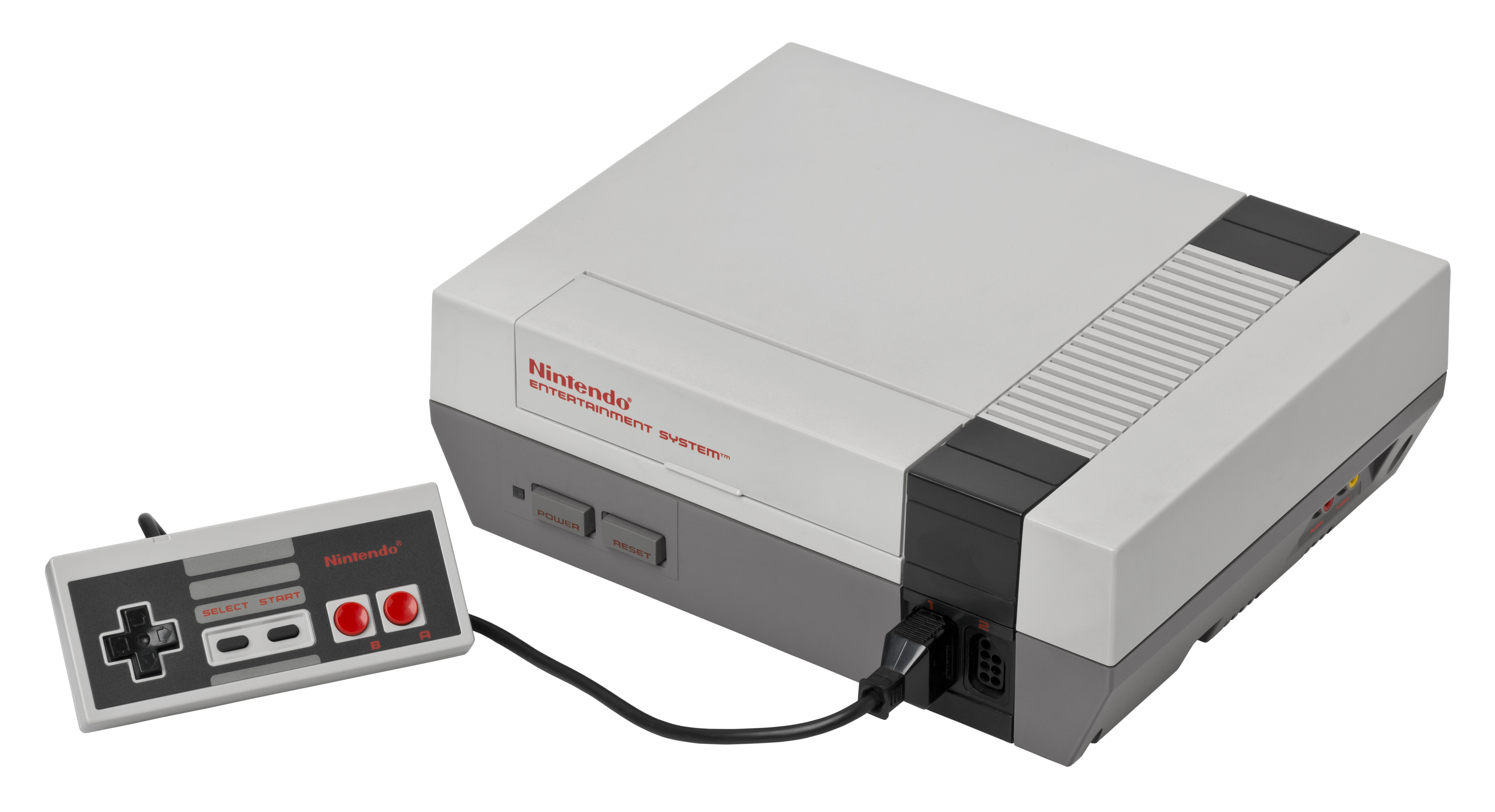
I decided to make a replica of a NES (nintendo entertainment system) seen below.
i started off with a basic cube,
i made it a rectangle and added another segment along the x/z axis


then i used the Knife tool to mark out the different parts of the console
making the shape editable, i then moved the base around using the rotate and move tools

i didn't know how to apply the textures to an inividual section on a shape
instead i copied the shame 3 times, 
firstly i deleted everything save for the black band on the first shape.
on the second shape i deleted the darker grey base area
and the final one didn't need altering.

i then changed their positions so that is was layered much like a photoshop document

i had to add a texture in for the top of the console that had a grate (along the black band)
but just adding a plane worked for that
then i added the logo on the front and i was satisfied with the console.

upon reflection i would have liked to add the smaller details (controller ports, power buttons etc.) however i plan to potentially use it within a larger thing so i am content with how it is presently.


SPACE SHIP -fun with nerbs

i started off with a sphere and made it editable
then using the extrude and move tools i reshaped it to the front of the ship

then i needed to add a body. i thought that a 'Capsual' object would work best for this

i then extruded it again and made it look more natural when joined

this  was a lot later in the process, however everything i added followed the above method.
although as you can see from the front/nose i added a hyperNURB, which smoothed it out entirelly, making it less jagged polygons and instead a much smoother surface

i added a "platonic" shape and it rests at the rear of the ship
i also put that in a hyperNERB and then i had my engine block

i thought that a Ring around the whole  ship would make it look less phallic, which i found was an issue, i then used the "matrix extend" tool to connect it inwards to the main body
a tool which i still dont understand the physics behind, but it seems to have worked to my favor here.

i also added some more to the main body/capsual piece of the ship to become wings, which i would like bigger but it looks silly bigger

here is a view of the objects menu as it stands

BReaking BAd habits -watching tv

 this is the first instance where i had to do something free, of my own creation
first of all i started off with something basic, and it pretty much had the same principals that the ipod task had
minus the curvature of the sides.
this was just playing around in the program, but it gave me the idea to continue it by making the corresponding TV
I placed down a plane to start it and then added a base for the TV, then a tube that connected the base to the TV
the TV itself was just a simple cube reshaped, allthough i did use the bevel tool to add a little curve on the edges

John helped my by teaching my how to use splines and sweepNURBS, which together could make wires like this.
i felt the TV wasn't complete without it.

I placed a plane down and rotated it to become the screen of the TV complete with show

here is the object menu that i was left with once i finished to the extent i was happy.
i thin that i could really use this TV in a future creation, such as a room.

 this was what i finished up with.
i actualy added a logo and On button to the fron because i thought it would seem empty if it lacked them, despite the screenshot of the show being displayed


A room with a veiw part-1
i wanted to model the protagonists room from the game pokemon fire red
as i think it's a decent environment to take and remake, also add a little more detail too
this is what i have as i left of recently, as you can see, it's not fully textured but it's in the works


this is the TV's progression, i started off making the stand/set of draws
it's comprised of 3 different boxes one for the main piece and two for the doors of the cabinet

then i put in the TV box on top, using a similar method to the TV on the previous project posted here.
although this one is a bulkier one.
it had two boxed for the tv set and a plane for the screen itself, i also curved the top of the back part of the tv box, where all the wiring is, much like on all old tv's
i then textured the screen to have a similar nintendo game.


i then actually decided to add a transparent screen, onto of the actual dispaly, much like a real tv has.


 The Bed
the bed was quite simple, it was mostly just boxes resized to be the frame of the whole bed, but i did have to do something a little more interesting to create the headboard.

i used a similar method to the wire i used with the TV project, by drawing out the headboard, and then using a small square to mark out the actual size of the pole that extends across the top.
then i added it into a SweepNURB and i was given this nice curved square rod
i added a thinner box to give it some substance and i was sorted, the bedframe was done (aside from textures)
i added in another box as a mattress, one as a blanket and a pillow
i was able to shape the blanket by curving off the sides much like a blanket would do

However, i have yet to find a method of making a pillow, but i am learning with every activity i do.

this is currentlly all the textures i have used, however, i expect these to increase as i add in more objects, such as books in the book case, or the desk and general clutter on it.
the textures are actually ripped from the image of the bedroom i am basing my work off, as i wanted to have it look as recreated as possible.

i forgot to mention the basics, the floor and the walls.
the walls are just plains i put in and textured

the floor is actually a grid of tiles, as it allows me to get a more accurate fix on where each set piece needs to go.

the carpet however is not really fixed onto the grid, but just placed a little farer away from the bed that's because i thought it would work better aesthetically rather than as close to the bed as it was.


this is where i currently am at with the room, although i do plan to continue working on it.


Thursday, 12 September 2013

Unit 68: Computer Game Design

games have allways been evolving ever since they came to be made
maybe it was due to competitiveness, or maybe it was just creative vision but overtime games have always tried to overcome the last big thing.


one of the biggest rivalries in games history is that of nintendo and sega.

(left: Super mario bro's)
(right: sonic the hedgehog)


originally Nintendo's "super mario bro's" took the world by storm, becoming almost a household name that even my granddad knows, he's never even played games. it became one of the biggest selling games of all time, until nintendo reclaimed that title from themselves with wii sports.

but seeing this fame and fortune Sega launched their own console to fight in this "console war"
leading to an industry of one-up-manship.
also making sega's slogan: "sega does, what ninten'don't" being awesome.

it really devolved into the fact that Sega had a 32bit console, whilst at the time nintendo only had a 16 -bit console.

A game that displays a generation advancement is the pokemon seires, one of nintendos major handheld games


Originaly on the gameboy, it sold well and became a global phenomenon, but this wasn't the end.
due to the success games continued to be made out of the series,
 the next major point was the leap to nintendo's 32-bit handheld, the 'gameboy advanced'
with a more varied colour pallet these games were more capable of telling a story and have more features due to advancements in game storage abilities


now there is the present day, in 2013 nintendo released the first pokemon games on the 3ds, these utilised the hardware at use and created from a simple birds eye rpg, the first 3d environment in the main series games of pokemon.
when you compare the images to the first images of the gameboy you can see such a massive leap in 15 years of development.


Due to the increasing amounts of hardware strength and capabilities games have advanced leaps and bounds over the years.
for example you have the legend of zelda series, from the 8-bit pixel based characters all the way to 3D models of varying detail and complexity, this series definitely


shows how consoles have adapted and changed through the years.