we had to create 3 shapes and put some light on them

i started by placing all the shapes together in a line, a sphere, cube and a cone

then adding a floor i then gave them colour.
each of the different colours was given about 50% reflectivity,
i found, it doesn't show in the actual screen when you're making it.
however id does show up when you render the image later.

i then added light, we only needed to get a single light source.
but i deceided to add in an extra spotlight, this was because i wanted shadows to show up.
they seemed to not show up with the

this is a screen shot of the pannel of objects, it's very similar to photoshop, and i am not certain, but i think it does work with layers too.

this was the final outcome for the basic exercise, i like the reflective surface and the shadows in this surreal scene
Task: iPod

we had to create an ipod using and instructional sheet, this is it during mid process.
it was a combination of several different shapes, being a rectangle, 'plane' and tube piece

i placed in a selection of textures to use once i had the layout of the ipod sorted.

as we learned in the last task, we could just drag and drop the textures onto the specific shape that warranted it

and this is the finished piece,
for the screen i added glow within the texture menu so it had some luminescence much like the ipod with it's backlight

with that done, i was able to copy and past it a few times changing the textures around
also rotated them to help it look like a stack of ipods
NES model

I decided to make a replica of a NES (nintendo entertainment system) seen below.
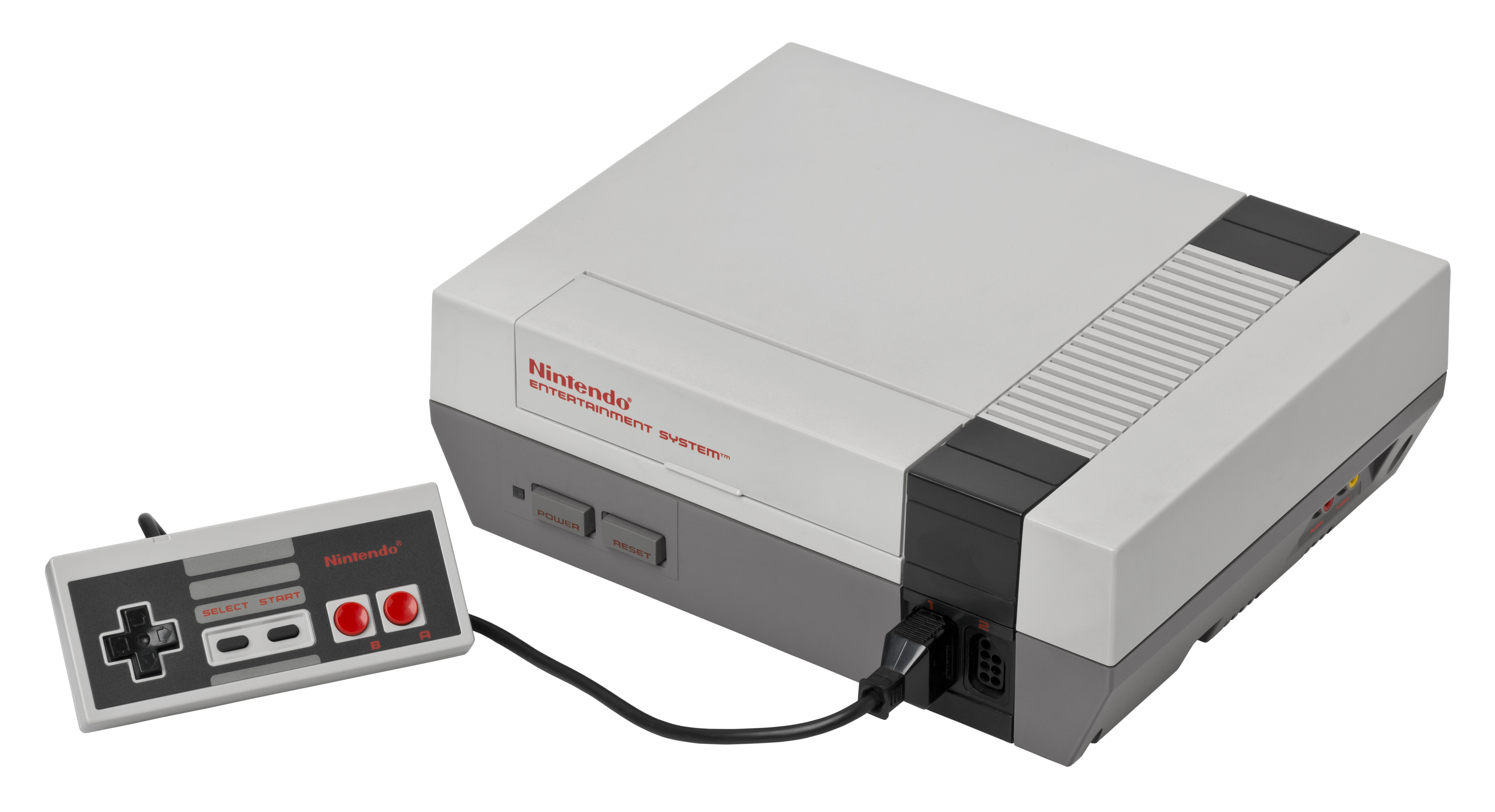
i started off with a basic cube,
i made it a rectangle and added another segment along the x/z axis

then i used the Knife tool to mark out the different parts of the console
making the shape editable, i then moved the base around using the rotate and move tools

i didn't know how to apply the textures to an inividual section on a shape
instead i copied the shame 3 times,
firstly i deleted everything save for the black band on the first shape.
on the second shape i deleted the darker grey base area
and the final one didn't need altering.
i then changed their positions so that is was layered much like a photoshop document

i had to add a texture in for the top of the console that had a grate (along the black band)
but just adding a plane worked for that

then i added the logo on the front and i was satisfied with the console.
upon reflection i would have liked to add the smaller details (controller ports, power buttons etc.) however i plan to potentially use it within a larger thing so i am content with how it is presently.
SPACE SHIP -fun with nerbs

i started off with a sphere and made it editable
then using the extrude and move tools i reshaped it to the front of the ship

then i needed to add a body. i thought that a 'Capsual' object would work best for this

i then extruded it again and made it look more natural when joined

this was a lot later in the process, however everything i added followed the above method.
although as you can see from the front/nose i added a hyperNURB, which smoothed it out entirelly, making it less jagged polygons and instead a much smoother surface
i added a "platonic" shape and it rests at the rear of the ship
i also put that in a hyperNERB and then i had my engine block
i thought that a Ring around the whole ship would make it look less phallic, which i found was an issue, i then used the "matrix extend" tool to connect it inwards to the main body
a tool which i still dont understand the physics behind, but it seems to have worked to my favor here.
i also added some more to the main body/capsual piece of the ship to become wings, which i would like bigger but it looks silly bigger

here is a view of the objects menu as it stands
BReaking BAd habits -watching tv
this is the first instance where i had to do something free, of my own creation

first of all i started off with something basic, and it pretty much had the same principals that the ipod task had
minus the curvature of the sides.
this was just playing around in the program, but it gave me the idea to continue it by making the corresponding TV

I placed down a plane to start it and then added a base for the TV, then a tube that connected the base to the TV
the TV itself was just a simple cube reshaped, allthough i did use the bevel tool to add a little curve on the edges

John helped my by teaching my how to use splines and sweepNURBS, which together could make wires like this.
i felt the TV wasn't complete without it.
I placed a plane down and rotated it to become the screen of the TV complete with show

here is the object menu that i was left with once i finished to the extent i was happy.
i thin that i could really use this TV in a future creation, such as a room.

i actualy added a logo and On button to the fron because i thought it would seem empty if it lacked them, despite the screenshot of the show being displayed
A room with a veiw part-1

i wanted to model the protagonists room from the game pokemon fire red
as i think it's a decent environment to take and remake, also add a little more detail too

this is what i have as i left of recently, as you can see, it's not fully textured but it's in the works

this is the TV's progression, i started off making the stand/set of draws
it's comprised of 3 different boxes one for the main piece and two for the doors of the cabinet

then i put in the TV box on top, using a similar method to the TV on the previous project posted here.
although this one is a bulkier one.
it had two boxed for the tv set and a plane for the screen itself, i also curved the top of the back part of the tv box, where all the wiring is, much like on all old tv's
i then textured the screen to have a similar nintendo game.

i then actually decided to add a transparent screen, onto of the actual dispaly, much like a real tv has.
The Bed

the bed was quite simple, it was mostly just boxes resized to be the frame of the whole bed, but i did have to do something a little more interesting to create the headboard.
i used a similar method to the wire i used with the TV project, by drawing out the headboard, and then using a small square to mark out the actual size of the pole that extends across the top.
then i added it into a SweepNURB and i was given this nice curved square rod

i added a thinner box to give it some substance and i was sorted, the bedframe was done (aside from textures)

i added in another box as a mattress, one as a blanket and a pillow
i was able to shape the blanket by curving off the sides much like a blanket would do
However, i have yet to find a method of making a pillow, but i am learning with every activity i do.

this is currentlly all the textures i have used, however, i expect these to increase as i add in more objects, such as books in the book case, or the desk and general clutter on it.
the textures are actually ripped from the image of the bedroom i am basing my work off, as i wanted to have it look as recreated as possible.
i forgot to mention the basics, the floor and the walls.
the walls are just plains i put in and textured
the floor is actually a grid of tiles, as it allows me to get a more accurate fix on where each set piece needs to go.
the carpet however is not really fixed onto the grid, but just placed a little farer away from the bed that's because i thought it would work better aesthetically rather than as close to the bed as it was.

this is where i currently am at with the room, although i do plan to continue working on it.

No comments:
Post a Comment